缓存策略
缓存策略决定了如何处理缓存数据和网络请求之间的关系。@keq-request/cache 提供了多种内置策略,并支持自定义策略。
Strategies.NETWORK_ONLY

仅网络 - 直接发送请求,不使用缓存,等价于不启用缓存中间件。
Strategies.NETWORK_FIRST

网络优先 - 优先尝试发送网络请求,如果失败则返回缓存。
Strategies.CACHE_FIRST
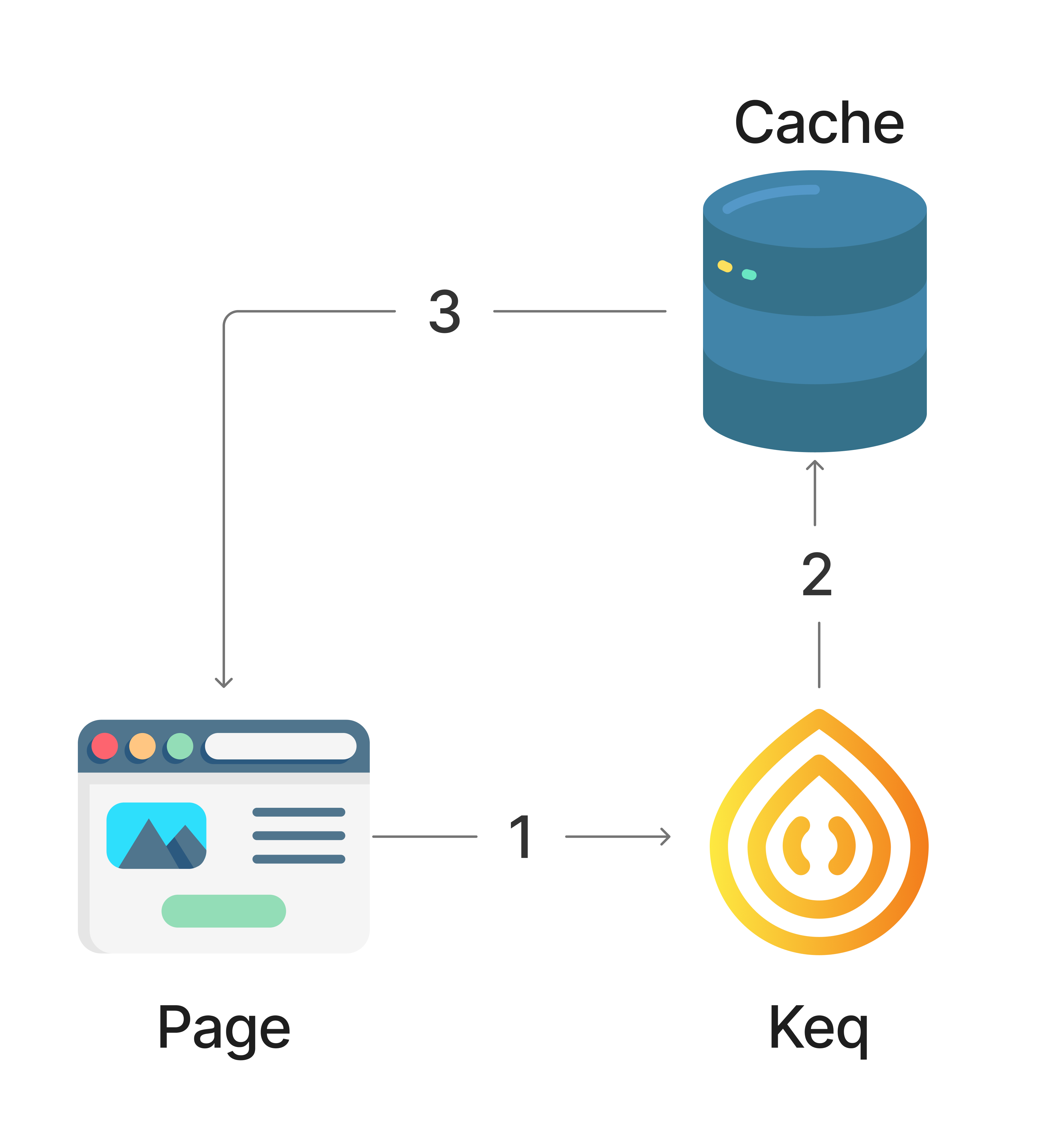
缓存优先 - 如果缓存存在则直接返回,否则发送网络请求。
Strategies.STALE_WHILE_REVALIDATE
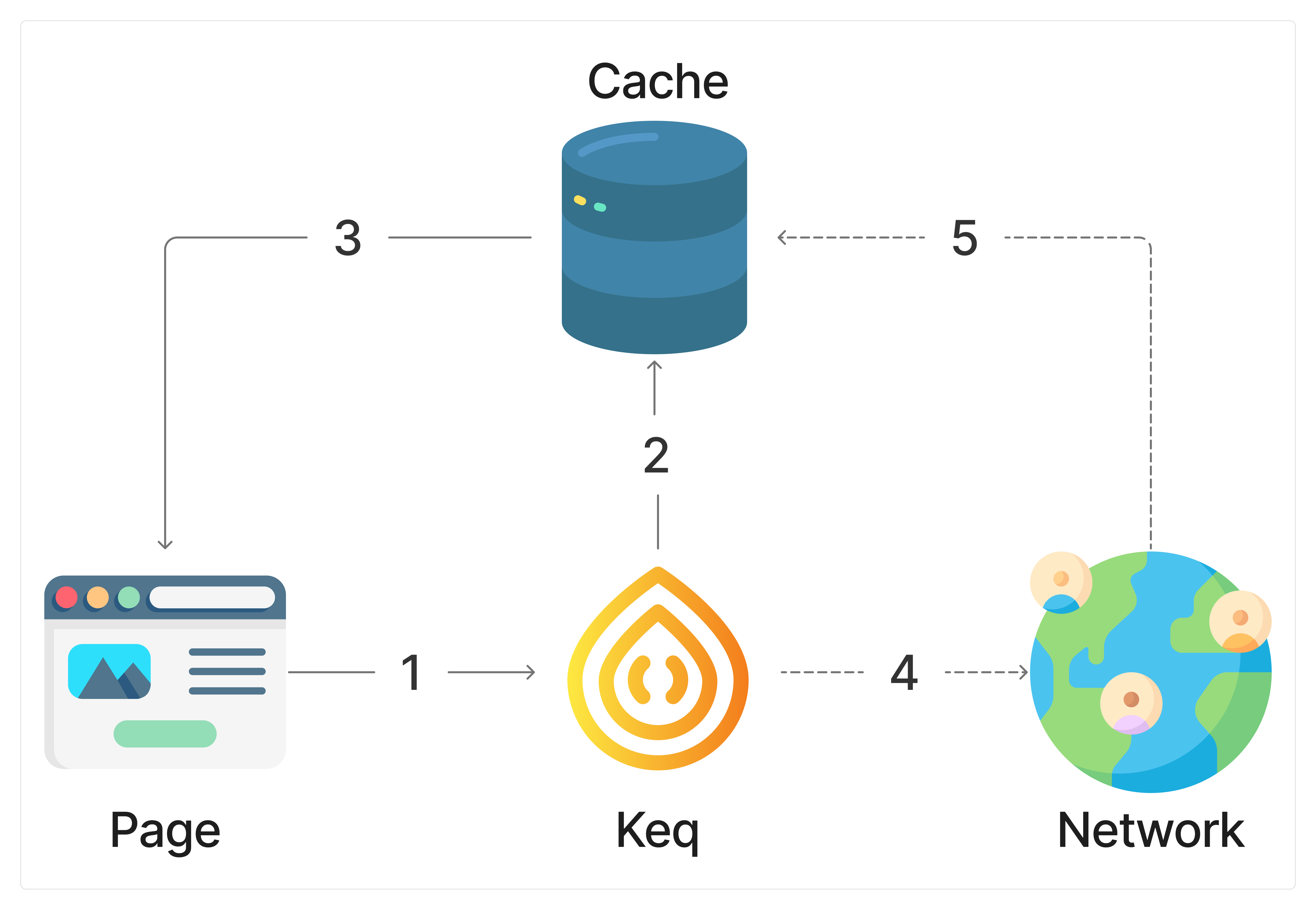
SWR - 如果缓存存在则立即返回缓存,同时异步发送网络请求更新缓存。
自定义策略
你可以实现自己的 Strategy 函数来控制缓存行为。
示例展示了CACHE_FIRST策略的简单实现:
import { request, KeqMiddleware } from "keq"
import { KeqCacheStrategy, KeqCacheParameters, CacheEntry } from "@keq-request/cache"

const MyCacheFirstStrategy: KeqCacheStrategy = async function (handler, context, next) {
  // const { storage, key } = params

  // return async function (context, next) {
  const [key,cache] = await handler.getCache(context)

  if (cache) {
    context.res = cache.response
    context.emitter.emit('cache:hit', { key, response: context.response, context }) // 不要忘记触发缓存命中事件
    return
  }

  context.emitter.emit('cache:miss', { key, context }) // 不要忘记触发缓存未命中事件

  // 发送请求
  await next()

  const [, entry] = await handler.setCache(context, key)
  if (entry) {
    // 不要忘记触发缓存更新事件
    context.emitter.emit('cache:update', {
      key: entry.key,
      oldResponse: cache?.response,
      newResponse: entry.response,
      context,
    })
  }
}

// 接下来你可以直接使用这个自定义策略
request
  .get("/example")
  .options({
    cache: {
      key: "custom-cache-key",
      strategy: MyCacheFirstStrategy,
      ttl: 60,
    },
  })
组合策略
实现全新的策略有些复杂,你需要的可能只是在不同场景下组合内置的策略:
import { KeqCacheStrategy, Strategies } from "@keq-request/cache"

const isNetworkFast = true

const MyStrategy: KeqCacheStrategy = async function (handler, context, next) {
  // 根据条件选择不同的策略
  if (isNetworkFast) {
    return Strategies.NETWORK_FIRST(handler, context, next)
  } else {
    // 其他情况使用边用边更新
    return Strategies.STALE_WHILE_REVALIDATE(handler, context, next)
  }
}